Welcome, Guest. Please login or register.

Author Topic: External 2 x SCSI Enclosure  (Read 1730 times)

Description:

0 Members and 1 Guest are viewing this topic.

Offline EverblueTopic starter

  • Hero Member
  • *****
  • Join Date: Dec 2004
  • Posts: 584
    • Show only replies by Everblue
External 2 x SCSI Enclosure
« on: September 03, 2007, 10:17:33 AM »
I got myself an external enclosure for 2 scsi peripherals, as seen in these pictures:


I want to use this with an Amiga 1200 + squirrel.

Unfortunately I do not have any manuals, and upon opening the box I found some wires and other ends that I do not know what these are for. As seen in the photos below:
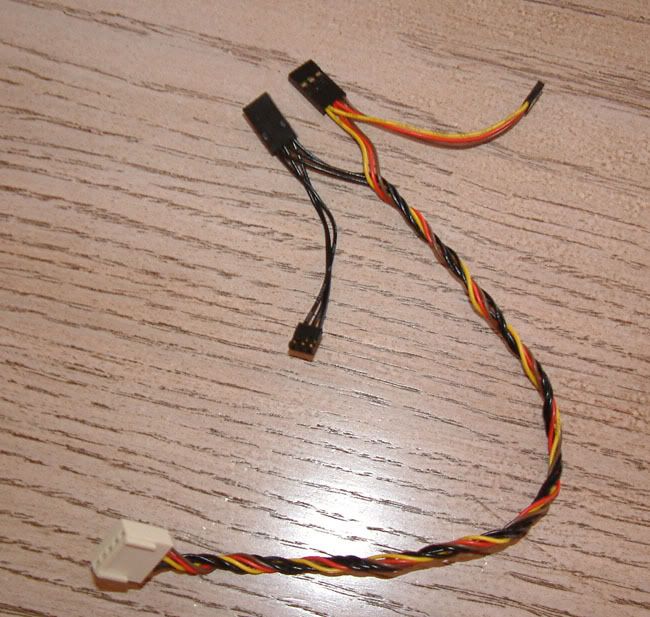
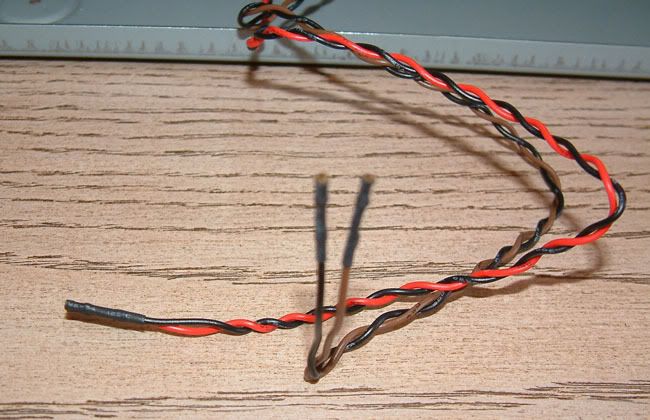


This one above are the front LED drive use indicator, I have no idea where these loose ends should go, though.

Here is a photo of inside the enclosure:
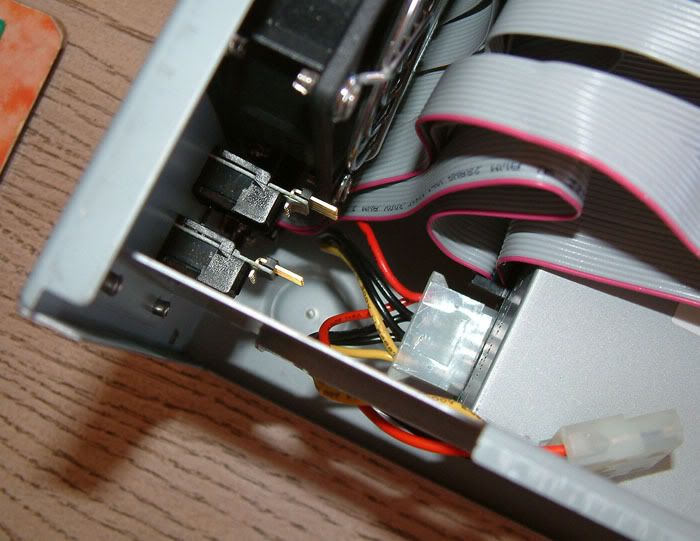

As you can see there is nothing connected to the two scsi terminal indicators.

Speaking of which, are these important? Do I need a 'SCSI Termination device'?

I do not know much how SCSI is supposed to be hooked up so any information would be appreciated - I have noticed that on the back of a SCSI CD-ROM drive I have acquired there is a series of jumpers indicating ID #.

Thanks in advance guys
 :-D

 

Offline rkauer

  • Hero Member
  • *****
  • Join Date: May 2006
  • Posts: 3263
    • Show only replies by rkauer
Re: External 2 x SCSI Enclosure
« Reply #1 on: September 03, 2007, 10:50:24 AM »
 The cables are intended to plug in the SCSI ID selectors in the back, so you don't need to alter the devices inside the case.

 Doubtfully you'll have the proper SCSI device to attach those. Set the SCSI ID directly on the devices.

 SCSI devices must have an unique number like as follow:

 - 0 OR 7 for the SCSI controller (the Squirrel is 0, IIRC);
 - 1 to 6 for the other devices

 Prefer 1 to the hd and 2 for the CD.

 Yes, you need terminators in both ends of the cable (one is built-in on the Squirrel), so you only need to terminate the other end.

 Check the hd (if you have one), normally they have terminators on the board (in a form of two resistors packs, or a jumper).

 Remember to terminate only[/] the last device in the cable.

 When running hdtoolbox, remember to call it via a CLI and type "hdtoolbox squirrel.device" in order to find the SCSI hd.

Goodbye people.

I\'ll pop on from time to time, RL is acting up.
 

Offline EverblueTopic starter

  • Hero Member
  • *****
  • Join Date: Dec 2004
  • Posts: 584
    • Show only replies by Everblue
Re: External 2 x SCSI Enclosure
« Reply #2 on: September 03, 2007, 10:57:46 AM »
Thanks a lot for the extensive info!

Any idea where the front HDD LED wires should go?
 

Offline rkauer

  • Hero Member
  • *****
  • Join Date: May 2006
  • Posts: 3263
    • Show only replies by rkauer
Re: External 2 x SCSI Enclosure
« Reply #3 on: September 03, 2007, 11:05:34 AM »
Quote

Everblue wrote:
Thanks a lot for the extensive info!

Any idea where the front HDD LED wires should go?


 If you have a SCSI hd, look in the device itself, probably will be a conector for the LED wires.

Goodbye people.

I\'ll pop on from time to time, RL is acting up.
 

Offline EverblueTopic starter

  • Hero Member
  • *****
  • Join Date: Dec 2004
  • Posts: 584
    • Show only replies by Everblue
Re: External 2 x SCSI Enclosure
« Reply #4 on: September 03, 2007, 11:19:20 AM »
Actually I have a SCSI cdrom - will look into it. Anyway, thanks a lot for the info!
 

Offline Zac67

  • Hero Member
  • *****
  • Join Date: Nov 2004
  • Posts: 2890
    • Show only replies by Zac67
Re: External 2 x SCSI Enclosure
« Reply #5 on: September 03, 2007, 09:14:43 PM »
CDROMs usually have a builtin LED, so there's no point in connecting an external LED - and no way either.
 

Offline EverblueTopic starter

  • Hero Member
  • *****
  • Join Date: Dec 2004
  • Posts: 584
    • Show only replies by Everblue
Re: External 2 x SCSI Enclosure
« Reply #6 on: September 03, 2007, 09:31:39 PM »
:P

LOL ok  :cry: