Welcome, Guest. Please login or register.

Author Topic: Easy question - mountlist for partition.  (Read 7683 times)

Description:

0 Members and 1 Guest are viewing this topic.

Offline ZeBeeDee

  • Hero Member
  • *****
  • Join Date: Jan 2007
  • Posts: 1081
    • Show only replies by ZeBeeDee
Re: Easy question - mountlist for partition.
« Reply #14 from previous page: August 25, 2008, 06:48:17 PM »
From what I can gather then, the solution is already there.

Load up HDTools, look at the partitions and see if the buffers are set any higher than between 30-50 per partition. If the values differ then change them and save the new partition info out (you should not lose any data) and there you go, problem solved!

AFAIK ... As Far As I Know  :-)

All your internet acronyms explained - here  :-)
To err is human ... to BOING divine!

[SIGPIC][/SIGPIC]
 

Offline kreciuTopic starter

Re: Easy question - mountlist for partition.
« Reply #15 on: August 25, 2008, 07:10:18 PM »
Thank you for patience.

I know how to change the size of buffer assigned to particular partition :). C:addbuffers

I would like to change the memory from which this buffers are added from Chip to Fast ram. This is my "issue".

Thank you for explanation of AFAIK :D
Re-A1200inE/BOX/3.2/AmigaOS3.2/TF1260@66Mhz/256Mb/MediatorTX/R9200SE/SpiderUSB/LAN/SB128/16Gb-CF/DVD-ROM/FDD-HD
 

Offline ZeBeeDee

  • Hero Member
  • *****
  • Join Date: Jan 2007
  • Posts: 1081
    • Show only replies by ZeBeeDee
Re: Easy question - mountlist for partition.
« Reply #16 on: August 25, 2008, 07:16:54 PM »
Then the only 2 things I can suggest are as follows:

1) Try the Prefs in OS3.9 - See if you get any joy there
2) Contact Piru and/or Astral on how to achieve your final aim

YW for the explanation  :-)
To err is human ... to BOING divine!

[SIGPIC][/SIGPIC]
 

Offline kreciuTopic starter

Re: Easy question - mountlist for partition.
« Reply #17 on: August 25, 2008, 08:00:30 PM »
IJWTK ;)

I will sent them PM so maybe they will "show me the way"...

OR ANYBODY? :D
Re-A1200inE/BOX/3.2/AmigaOS3.2/TF1260@66Mhz/256Mb/MediatorTX/R9200SE/SpiderUSB/LAN/SB128/16Gb-CF/DVD-ROM/FDD-HD
 

Offline A4000_Mad

  • Hero Member
  • *****
  • Join Date: Dec 2006
  • Posts: 1392
    • Show only replies by A4000_Mad
Re: Easy question - mountlist for partition.
« Reply #18 on: August 25, 2008, 08:24:24 PM »
Quote

kreciu wrote:

Small question ;). Where I can find a mountlists for a particular partition?


 :-o I used Giggledisk on my 8.4GB IDE hard drive thinking it would just see one device, get confused, trash my hard drive, crash the computer or report nothing. However, it put mountlists for all 7 partitions in RAM:
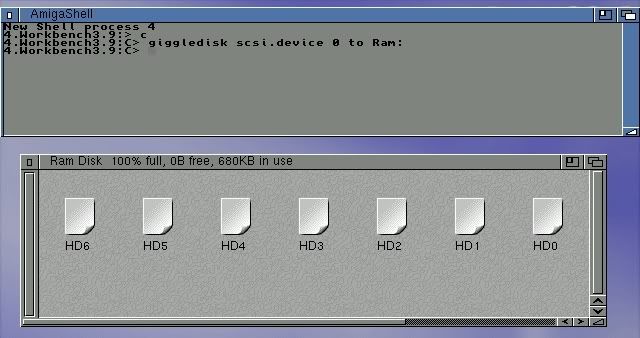


HD0

/*
** DosDriver automatically created by GiggleDisk
**
** GiggleDisk (c)2005 Guido Mersmann
**
*/

FileSystem       = L:pfs3ds
Device           = scsi.device
Unit             = 0
BlockSize        = 512
Surfaces         = 16
SectorsPerBlock  = 1
BlocksPerTrack   = 63
Reserved         = 2
PreAlloc         = 0
Interleave       = 0
MaxTransfer      = 0x0001FE00
Mask             = 0x7FFFFFFE
LowCyl           = 2
HighCyl          = 140
Buffers          = 80
BufMemType       = 0
StackSize        = 16384
Priority         = 0
GlobVec          = -1
DosType          = 0x50445303
Activate         = 1
Mount            = 1
/* Bootable      = TRUE */


HD1

/*
** DosDriver automatically created by GiggleDisk
**
** GiggleDisk (c)2005 Guido Mersmann
**
*/

FileSystem       = L:pfs3ds
Device           = scsi.device
Unit             = 0
BlockSize        = 512
Surfaces         = 16
SectorsPerBlock  = 1
BlocksPerTrack   = 63
Reserved         = 2
PreAlloc         = 0
Interleave       = 0
MaxTransfer      = 0x0001FE00
Mask             = 0x7FFFFFFE
LowCyl           = 141
HighCyl          = 4338
Buffers          = 80
BufMemType       = 0
StackSize        = 16384
Priority         = 0
GlobVec          = -1
DosType          = 0x50445303
Activate         = 1
Mount            = 1
/* Bootable      = FALSE */
 

HD2

/*
** DosDriver automatically created by GiggleDisk
**
** GiggleDisk (c)2005 Guido Mersmann
**
*/

FileSystem       = L:pfs3ds
Device           = scsi.device
Unit             = 0
BlockSize        = 512
Surfaces         = 16
SectorsPerBlock  = 1
BlocksPerTrack   = 63
Reserved         = 2
PreAlloc         = 0
Interleave       = 0
MaxTransfer      = 0x0001FE00
Mask             = 0x7FFFFFFE
LowCyl           = 4339
HighCyl          = 4792
Buffers          = 80
BufMemType       = 0
StackSize        = 16384
Priority         = 2
GlobVec          = -1
DosType          = 0x50445303
Activate         = 1
Mount            = 1
/* Bootable      = TRUE */


HD3

/*
** DosDriver automatically created by GiggleDisk
**
** GiggleDisk (c)2005 Guido Mersmann
**
*/

FileSystem       = L:pfs3ds
Device           = scsi.device
Unit             = 0
BlockSize        = 512
Surfaces         = 16
SectorsPerBlock  = 1
BlocksPerTrack   = 63
Reserved         = 2
PreAlloc         = 0
Interleave       = 0
MaxTransfer      = 0x0001FE00
Mask             = 0x7FFFFFFE
LowCyl           = 4793
HighCyl          = 5034
Buffers          = 80
BufMemType       = 0
StackSize        = 16384
Priority         = 0
GlobVec          = -1
DosType          = 0x50445303
Activate         = 1
Mount            = 1
/* Bootable      = FALSE */


HD4

/*
** DosDriver automatically created by GiggleDisk
**
** GiggleDisk (c)2005 Guido Mersmann
**
*/

FileSystem       = L:pfs3ds
Device           = scsi.device
Unit             = 0
BlockSize        = 512
Surfaces         = 16
SectorsPerBlock  = 1
BlocksPerTrack   = 63
Reserved         = 2
PreAlloc         = 0
Interleave       = 0
MaxTransfer      = 0x0001FE00
Mask             = 0x7FFFFFFE
LowCyl           = 5035
HighCyl          = 9968
Buffers          = 80
BufMemType       = 0
StackSize        = 16384
Priority         = 0
GlobVec          = -1
DosType          = 0x50445303
Activate         = 1
Mount            = 1
/* Bootable      = FALSE */


HD5

/*
** DosDriver automatically created by GiggleDisk
**
** GiggleDisk (c)2005 Guido Mersmann
**
*/

FileSystem       = L:pfs3ds
Device           = scsi.device
Unit             = 0
BlockSize        = 512
Surfaces         = 16
SectorsPerBlock  = 1
BlocksPerTrack   = 63
Reserved         = 2
PreAlloc         = 0
Interleave       = 0
MaxTransfer      = 0x0001FE00
Mask             = 0x7FFFFFFE
LowCyl           = 9969
HighCyl          = 14277
Buffers          = 80
BufMemType       = 0
StackSize        = 16384
Priority         = 0
GlobVec          = -1
DosType          = 0x50445303
Activate         = 1
Mount            = 1
/* Bootable      = FALSE */


HD6

/*
** DosDriver automatically created by GiggleDisk
**
** GiggleDisk (c)2005 Guido Mersmann
**
*/

FileSystem       = L:pfs3ds
Device           = scsi.device
Unit             = 0
BlockSize        = 512
Surfaces         = 16
SectorsPerBlock  = 1
BlocksPerTrack   = 63
Reserved         = 2
PreAlloc         = 0
Interleave       = 0
MaxTransfer      = 0x0001FE00
Mask             = 0x7FFFFFFE
LowCyl           = 14278
HighCyl          = 16707
Buffers          = 80
BufMemType       = 0
StackSize        = 16384
Priority         = 0
GlobVec          = -1
DosType          = 0x50445303
Activate         = 1
Mount            = 1
/* Bootable      = FALSE */


Well you did ask the question :-D  :-D  :-D

I see that BufMemType you mentioned is in there with mine set to 0 :inquisitive:

A4000 Mad
 

Offline Thomas

Re: Easy question - mountlist for partition.
« Reply #19 on: August 25, 2008, 09:47:36 PM »
@A4000_Mad:

This does not help. You cannot change anything when the partition is already mounted.


@kreciu:

It is indeed possible to set the buffmemtype for partitions. However, I don't know of any program which can do this yet. One would have to write one.

Mountlists for partitions are stored in binary format in the first few blocks of the hdd, outside of any partition. Changing them is not as easy as to edit a text file. But it is possible.

Bye,
Thomas

Offline kreciuTopic starter

Re: Easy question - mountlist for partition.
« Reply #20 on: August 25, 2008, 10:17:13 PM »
Yes, this program is good for "reading" what is in which partition.

Than the second program would be needed to "save" this in RDB of HDD.

Basically is like creating a HDToolBox but this kind were we could change ALL the "settings" of partition.

Unfortunately HDToolBox doesn't have this option what I'm looking for :(

I'm really curious how this worked for Astral? I hope he will answer my email, so we all could learn something.

Ps. And now, can anybody tell tham Amiga is "boring" computer? :-D

I just realized, that "mounting" drivers in Amiga is just "copying" them from Devs: to Storage: (or somewhere!).

EDIT: I need program like RDB-Salv, but this one is not freeware.
EDIT: Are you sure that this can't be done from HDToolBox?
Re-A1200inE/BOX/3.2/AmigaOS3.2/TF1260@66Mhz/256Mb/MediatorTX/R9200SE/SpiderUSB/LAN/SB128/16Gb-CF/DVD-ROM/FDD-HD
 

Offline A4000_Mad

  • Hero Member
  • *****
  • Join Date: Dec 2006
  • Posts: 1392
    • Show only replies by A4000_Mad
Re: Easy question - mountlist for partition.
« Reply #21 on: August 25, 2008, 11:05:21 PM »
Quote

kreciu wrote:
Ps. And now, can anybody tell tham Amiga is "boring" computer? :-D

I just realized, that "mounting" drivers in Amiga is just "copying" them from Devs: to Storage: (or somewhere!).


Nope! The Amiga sure ain't boring when there are questions like yours coming at us to keep us busy :-D

You meant to say "copying" the mountlist from Workbench:Storage/DOSDrivers to Workbench:Devs/DOSDrivers of course ;-)

Hope you'll let us know what Piru or Astral have to say about changing the BufMemType in that other thread :inquisitive:

:pint:
A4000 Mad