Welcome, Guest. Please login or register.

Author Topic: Make CD refresher  (Read 3190 times)

Description:

0 Members and 1 Guest are viewing this topic.

Offline WilseTopic starter

Make CD refresher
« on: January 16, 2008, 07:31:34 PM »
Hi folks,

Some stupid questions ahead so apologies in advance.

I've been mucking about with my A1 for the first time in ages tonight and was hoping to burn a CDRW of some midi files.

I've forgotten how to do this with MakeCD.

Do I select Add > Image file?

Also, blank CDRW is showing on WB screen as uninitialised. Is there a way to rectify this?

Offline WilseTopic starter

Re: Make CD refresher
« Reply #1 on: January 16, 2008, 07:44:14 PM »
Quote
blank CDRW is showing on WB screen as uninitialised.


I should add, "CD-RW Erase" returns a hardware error.

Offline AmigaMance

  • Hero Member
  • *****
  • Join Date: Apr 2005
  • Posts: 1278
    • Show only replies by AmigaMance
Re: Make CD refresher
« Reply #2 on: January 16, 2008, 09:40:37 PM »
Quote
I've forgotten how to do this with MakeCD.

Do I select Add > Image file?

 Assuming that you want to burn a directory of midi files and not an ISO: add -> type: File system.
Press the button right bellow "File system" and chose the directory by pressing "add" and the down-arrow button.
A1200 PPC user.
 

Offline A4000_Mad

  • Hero Member
  • *****
  • Join Date: Dec 2006
  • Posts: 1392
    • Show only replies by A4000_Mad
Re: Make CD refresher
« Reply #3 on: January 16, 2008, 10:03:53 PM »
Wilse,

My own method is to put all the data I want written to CD into a drawer called Container. The plan being that the contents of the drawer Container are written to the CD.


Firstly I launch MakeCD and click on 'Add'
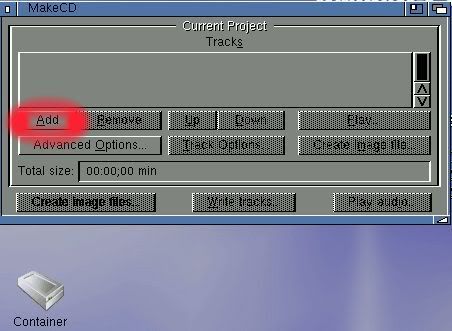


Then I click on the arrow circled red in the screengrab below.
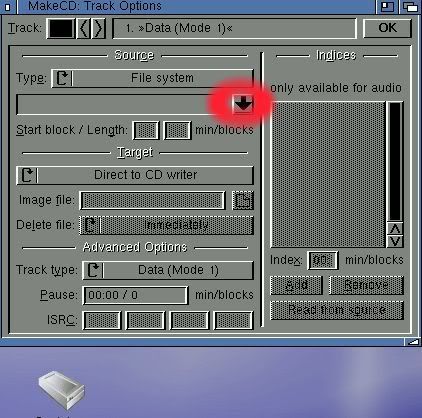


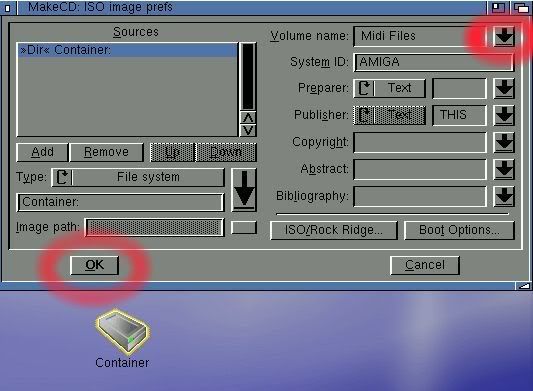
Then I click on the arrow at the top right of this screengrab to give the CD a name ("Midi Files" in this example)

Next I drag and drop the drawer Container into the top left window. ("Dir Container:" highlighted in blue)

Now I click on 'OK' at the bottom left of the screen.


I click on 'OK' again at the top right of the next screen.
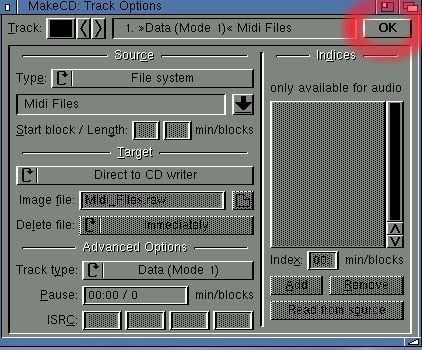


Next I click on 'Write tracks.....'
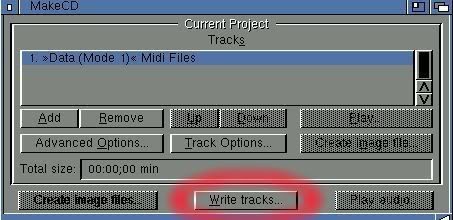


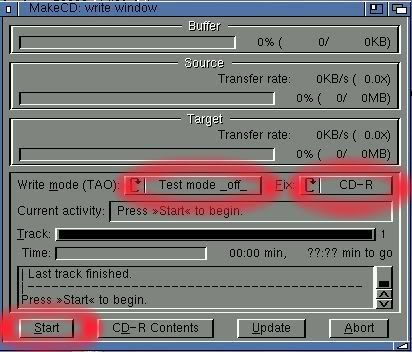
Now I change 'Test mode _on_' to 'Test mode _off_'

change 'Session' to 'CD-R' and click on 'Start'.


Finally I click on 'Update + OK'
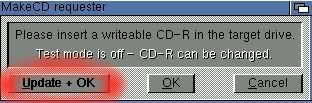


After exiting MakeCD it appears the newly written CD-R shows up as "Uninitialised" until it has been ejected and re-inserted.


Well, this has sure kept me out of mischief for a while :-D


:pint:

A4000 Mad
 

Offline rkauer

  • Hero Member
  • *****
  • Join Date: May 2006
  • Posts: 3263
    • Show only replies by rkauer
Re: Make CD refresher
« Reply #4 on: January 16, 2008, 10:18:01 PM »
 Wow!:-o

 Excellent tutorial you have done!

 Congratulations!:cheers:
Goodbye people.

I\'ll pop on from time to time, RL is acting up.
 

Offline WilseTopic starter

Re: Make CD refresher
« Reply #5 on: January 16, 2008, 10:24:23 PM »
@A4000 MAD:

Thanks for that fantastic walk through.

I'm following it now. Currently creating image. I'll let you know how it goes.

Offline WilseTopic starter

Re: Make CD refresher
« Reply #6 on: January 16, 2008, 10:27:46 PM »
Still getting Hardware Error.

I don't think it's recognising the CDRW.

I'll try with a different disc.

Offline WilseTopic starter

Re: Make CD refresher
« Reply #7 on: January 17, 2008, 07:55:08 PM »
Sorry for the delay - had to go out last night.

Turns out it works fine with a CDR but not a CDRW.

Am now trying the same thing on my Pegasos (first time I have switched it on in about a year) to see if it'll burn to CDRW.........

... Wow! It appears it works on Peg1 but not on A1.


Anyway, thank you for your help folks.

especially A4000_MAD:
Quote
Well, this has sure kept me out of mischief for a while


I bet it did - much appreciated.

:pint:

Offline monami

  • Sr. Member
  • ****
  • Join Date: Nov 2006
  • Posts: 461
    • Show only replies by monami
Re: Make CD refresher
« Reply #8 on: January 17, 2008, 08:27:52 PM »
are you using the media (disks) recommended for your cdrw drive? especially if it's an early drive? if not you will get problems. ask the manufacturer.
i will bless them that bless you. i will curse them that curse you. gods promise to his chosen people the jews.
 

Offline A4000_Mad

  • Hero Member
  • *****
  • Join Date: Dec 2006
  • Posts: 1392
    • Show only replies by A4000_Mad
Re: Make CD refresher
« Reply #9 on: January 17, 2008, 09:40:53 PM »
Quote
rkauer wrote:
Excellent tutorial you have done!


Thank you rkauer :-)

Quote

Wilse wrote:
@A4000 MAD:

Thanks for that fantastic walk through.


You're very welcome Wilse. Glad it was of help :pint:
A4000 Mad
 

Offline AJS

  • Full Member
  • ***
  • Join Date: Sep 2002
  • Posts: 131
    • Show only replies by AJS
Re: Make CD refresher
« Reply #10 on: January 20, 2008, 03:10:40 PM »
Quote

A4000_Mad wrote:
Quote
rkauer wrote:
Excellent tutorial you have done!


Thank you rkauer :-)

Quote

Wilse wrote:
@A4000 MAD:

Thanks for that fantastic walk through.


You're very welcome Wilse. Glad it was of help :pint:


A4000 Mad thanks for the refresher, it's been a while since I played with MakeCD :-) So have saved this for future reference  :-D  
:idea: maybe you should put it into the tutorial section? :idea:
Too often, we lose sight of life’s simply pleasures. Remember, When someone annoys you it takes 42 muscles to frown, BUT it only takes 4 to extend your arm and bitch slap that mother *’##@*&% upside the head .
 

Offline Nlandas

  • Hero Member
  • *****
  • Join Date: Dec 2007
  • Posts: 678
    • Show only replies by Nlandas
Re: Make CD refresher
« Reply #11 on: February 03, 2008, 08:44:31 PM »
Thanks A4000_Mad, you've single handedly gotten me back into the swing of things using my Amiga. The thing I remember best about the Amiga scene was how many people went out of their way to be helpful to each other.

This hasn't changed after all this time. It's always been Amigas biggest asset IMNSHO. You've certainly carried on that tradition. It's good to be back.

-Nyle
I think, Therefore - Amiga....