Daniele wrote:
What the heck is going on!
That's what we're all wondering :-D
CD0:Uninitialized can simply mean that it is an unreadable CD. You get the same thing for a faulty floppy as you will know.
I'm not familiar with the Express gadget as I have old 4 way buffered IDE interfaces in my A1200 Towers. But from my experience you either have a driver using 'scsi.device' and L:CDfilesystem
OR
atapi.device and L:CacheCDFS
The screengrab below shows that I can get two icons for the same OS3.9 CD. I've click on each icon and selected 'Infornation' from the top of the Workbench screen. I had put two drivers called CD0 and CD2 into Workbench:Devs/DOSDrivers.
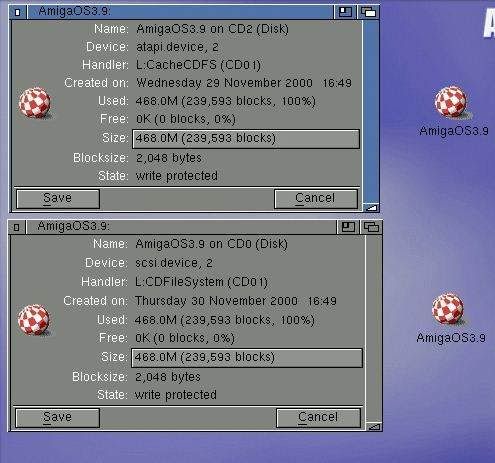
My A4000 Desktop using OS3.9 has 2 IDE leads and has IDEfix97 running. The 1st lead has Unit 0 (Master hard drive) and unit 1 (Nothing attached). The 2nd IDE lead has Unit 2 (Master CDrom) and Unit 3 (Slave Zip drive)
Check you have the files 'IDEfix' and 'LoadIDE' in your C drawer of Workbench. These lines in your startup-sequence should *not* have semi colons in front of them or they will be deactivated:-
If exists C:IDEfix
C:IDEfix
End If
Check the jumpers on your devices and the IDE lead positions you've got them attached. Check the unit number your CDrom driver is set to. Do you want me to E-mail FindDevice to you?

