Welcome, Guest. Please login or register.

Author Topic: Squirrel interface and CD-Rom how to Install?  (Read 4745 times)

Description:

0 Members and 1 Guest are viewing this topic.

Offline A4000_Mad

  • Hero Member
  • *****
  • Join Date: Dec 2006
  • Posts: 1392
    • Show all replies
Re: Squirrel interface and CD-Rom how to Install?
« on: March 05, 2007, 12:02:46 AM »
Hmmm..... This would connect to the PCMCIA slot of an A1200 so I guess you are using a right angled gadget? It also looks like you already have a CDrom in your A1200 Tower. So I guess you are using IDE fix or EIDE fix? If so, you should be able to use 'Find Device' in the IDE fix drawer to locate your CD-Rom and find out its unit number. Tick the box 'Show All Device Types' before clicking on 'Scan'. It should show up under 'squirrelscsi.device'. You should also see the unit number of the new device.

It is then a matter of having the correct dos drive in Workbench:Devs/DOSDrivers. You can probably make a copy of and then modify the driver CD0 or CD1 that makes your current CDrom work.


Can you tell us anything else that might help us to help you?  :-)

A4000 Mad


EDIT - I may have wrongly assumed that the Squirrel interface and CD-Rom were for the A1200 in your sig. If it is for an A1200 Desktop then kindly disregard this post  :lol:

G'night :sleep:
A4000 Mad
 

Offline A4000_Mad

  • Hero Member
  • *****
  • Join Date: Dec 2006
  • Posts: 1392
    • Show all replies
Re: Squirrel interface and CD-Rom how to Install?
« Reply #1 on: March 05, 2007, 12:19:07 AM »
 :lol:  :lol:  :lol:

I was right that I was wrong. Sorry but I really have to go to bed now. I'll try to be of help tomorrow in the unlikely event that no-one else has  :-)

A4000 Mad
A4000 Mad
 

Offline A4000_Mad

  • Hero Member
  • *****
  • Join Date: Dec 2006
  • Posts: 1392
    • Show all replies
Re: Squirrel interface and CD-Rom how to Install?
« Reply #2 on: March 05, 2007, 12:36:49 AM »
Just quickly before I put my tired brain cell to bed.........

If you have an IDE fix drawer in your A1200 Tower, bring the whole drawer or just 'Find Device'to the A1200 Desktop on a floppy disk. Find out what you can as per my post above.

That'll teach me not to stay up half the night watching the moon  :lol:

G'night,

A4000 Mad
A4000 Mad
 

Offline A4000_Mad

  • Hero Member
  • *****
  • Join Date: Dec 2006
  • Posts: 1392
    • Show all replies
Re: Squirrel interface and CD-Rom how to Install?
« Reply #3 on: March 08, 2007, 11:36:39 PM »
@ twizzle

Sorry if this duplicates what you have said but your post was not here when I went off to continue working on this in an A1200 Desktop.


Hi Mick,

Well I did threaten to return :lol: You could have a hardware problem by the sounds of it, but a ramble and a few screenshots might help you or somebody somewhere with something


My one of these.............


.......... plugs into the bottom socket of this Sony CDrom.


I have no jumpers to set and nothing goes in the top socket (yours is probably a lot different by the sounds of it and may indeed need a terminator). I can only push in the tiny buttons to increase or lower the unit ID number. It is currently set to 3.
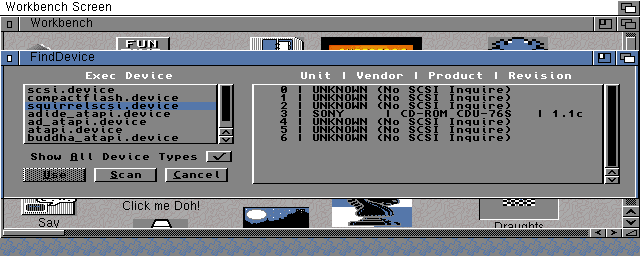


In the above screengrab I have used 'FindDevice' taken out the 'IDE Fix 97' drawer in an A4000 Desktop. I simply ticked the box 'Show All Device Types' and then clicked on 'Scan'. On the left you can see that the CDrom is showing up as a 'squirrelscsidevice' and on the right as Unit 3 in the list. You might want to *check* that you do have 'squirrelscsi.device' in Workbench:Devs

NOTE that I have not used 'FindDevice' for any setting up purposes. It is just a good way of checking that your A1200 can see your CDrom on the PCMCIA slot. *All* you need to get your CDrom working is a CD0 icon in Workbench:Devs/DOSDrivers that is set to the correct device type and unit number.
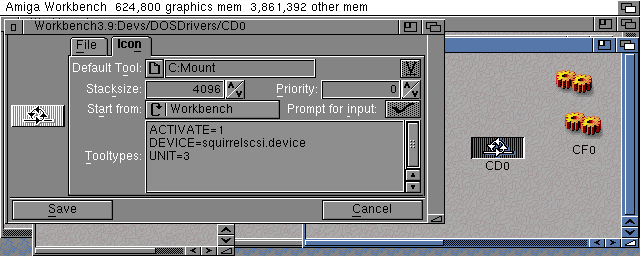


The above screengrab shows what Amiduffer was telling you about. i.e. clicking once on the CD0 icon, selecting information from the menu and changing the unit number and device type.
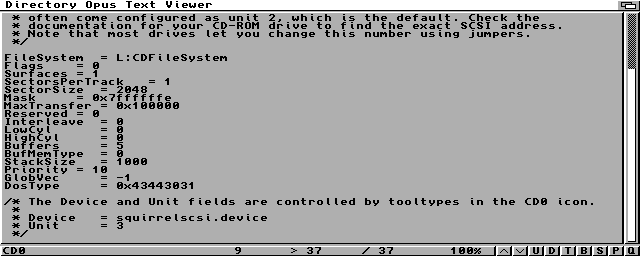
However, it appears that doing this only changes the 'CD0.info' file and not the mounlist of CD0 itself. Below is the mountlist viewed in DirectoryOpus. So you need to make sure that the bottom two lines are correct in something like DirectoryOpus as well. i.e.  

*  Device = squirrelscsi.device

*  Unit = 3


Oh... the icon CF0 that is also in the screengrab is for working a Compact Flash card in the PCMCIA slot.


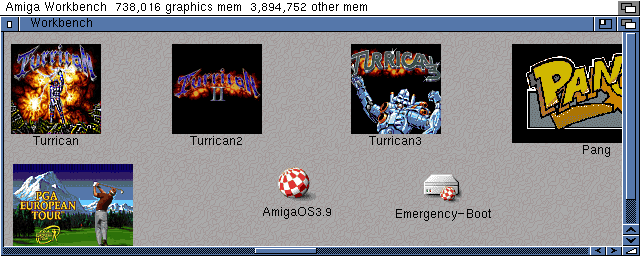
I guess I should finish off with a screengrab showing the icons of an inserted OS3.9 CD. And for newbies or those interested, the great game icons are what you get when you use the WHDLoad installers :-)


Possibly remotely interesting stuff:-

The screengrabs were taken using CyberGrab on a ToolsDaemon menu so as not to take a grab showing the prog itself. The ILBM screengrabs were then loaded into PPaint and coverted to PNG with maximum compression. The PNG files were then put onto a Compact Flash card and taken to a USB card reader on this PC. (I had to remove the Squirrel and CDrom so as to be able to insert the Compact Flash card into the PCMCIA slot of the A1200 Desktop of course)


Well that's my brain cell exhausted for today.

G'night :sleep:


A4000 Mad

A4000 Mad
 

Offline A4000_Mad

  • Hero Member
  • *****
  • Join Date: Dec 2006
  • Posts: 1392
    • Show all replies
Re: Squirrel interface and CD-Rom how to Install?
« Reply #4 on: March 09, 2007, 04:50:58 PM »
Yes a drive with no CD inserted or one that cannot read a CD due to a faulty lens prehaps, should still show up...... unless it is completely broken.

I've just sent FindDevice and a copy of the CD0 that works my CDrom to the e-mail address in your profile as LHA files. Hope that is of some help :-)

Hmmm... After looking again at the mountlist in the screengrab above, prehaps you should just check that you have 'CDFileSystem' in the L drawer of your Workbench as CD0 will look for it.

FileSystem = L:CDFileSystem


A4000 Mad
A4000 Mad