Welcome, Guest. Please login or register.

Author Topic: Making two images use the same palette  (Read 2262 times)

Description:

0 Members and 1 Guest are viewing this topic.

Offline motorollinTopic starter

  • Hero Member
  • *****
  • Join Date: Nov 2005
  • Posts: 8669
    • Show all replies
Making two images use the same palette
« on: September 14, 2008, 05:04:17 PM »
I'm creating some preview images for use with AGS, and the pictures have to be the same palette as the background image. How can I convert the preview image I'm using to the same palette as the background without the colours changing? I currently have PPaint installed if that helps.

--
moto
Code: [Select]
10  IT\'S THE FINAL COUNTDOWN
20  FOR C = 1 TO 2
30     DA-NA-NAAAA-NAAAA DA-NA-NA-NA-NAAAA
40     DA-NA-NAAAA-NAAAA DA-NA-NA-NA-NA-NA-NAAAAA
50  NEXT C
60  NA-NA-NAAAA
70  NA-NA NA-NA-NA-NA-NAAAA NAAA-NAAAAAAAAAAA
80  GOTO 10
 

Offline motorollinTopic starter

  • Hero Member
  • *****
  • Join Date: Nov 2005
  • Posts: 8669
    • Show all replies
Re: Making two images use the same palette
« Reply #1 on: September 14, 2008, 05:27:21 PM »
I loaded the background image in to PPaint then loaded the preview image as a brush. Of course, the colours were all wrong. I then selected Brush > Color > Remap and it seemed to fix the brush to look correct in that palette, but when I displayed it with the background in AGS, the colours were still wrong :-(

--
moto
Code: [Select]
10  IT\'S THE FINAL COUNTDOWN
20  FOR C = 1 TO 2
30     DA-NA-NAAAA-NAAAA DA-NA-NA-NA-NAAAA
40     DA-NA-NAAAA-NAAAA DA-NA-NA-NA-NA-NA-NAAAAA
50  NEXT C
60  NA-NA-NAAAA
70  NA-NA NA-NA-NA-NA-NAAAA NAAA-NAAAAAAAAAAA
80  GOTO 10
 

Offline motorollinTopic starter

  • Hero Member
  • *****
  • Join Date: Nov 2005
  • Posts: 8669
    • Show all replies
Re: Making two images use the same palette
« Reply #2 on: September 14, 2008, 06:17:01 PM »
Yes I did re-save the brush once I had remapped the palette. I will try it again.

--
moto
Code: [Select]
10  IT\'S THE FINAL COUNTDOWN
20  FOR C = 1 TO 2
30     DA-NA-NAAAA-NAAAA DA-NA-NA-NA-NAAAA
40     DA-NA-NAAAA-NAAAA DA-NA-NA-NA-NA-NA-NAAAAA
50  NEXT C
60  NA-NA-NAAAA
70  NA-NA NA-NA-NA-NA-NAAAA NAAA-NAAAAAAAAAAA
80  GOTO 10
 

Offline motorollinTopic starter

  • Hero Member
  • *****
  • Join Date: Nov 2005
  • Posts: 8669
    • Show all replies
Re: Making two images use the same palette
« Reply #3 on: September 14, 2008, 06:35:39 PM »
Just tried it again and had the same problem. Here is exactly what I did:

1. Load the background image (SelectorBKG.iff) in to PPaint. Accept its dimensions and colour depth (640x256x256)
2. Load the preview image (nebulus.png) as a brush, which appears with incorrect colours
3. Remap the colours of the brush, and it appears with correct colours
4. Save the brush as an ILBM using:
a. Compression
b. Screen Format
c. Both Compression and Screen Format
d. Neither Compression nor Screen Format

In all cases, it turns out something like this:
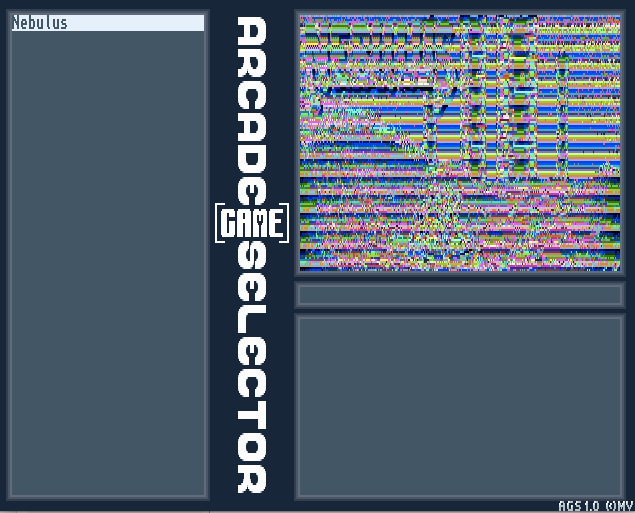


The image appears correctly if I open it in Multiview.

I'm wondering whether PPaint is saving in a format that AGS doesn't like? According to the AGS instructions, "name.iff should be a 320x128x8 bits image using the same palette as the background image". As far as I can tell, that's exactly what it is. :-?

--
moto

Code: [Select]
10  IT\'S THE FINAL COUNTDOWN
20  FOR C = 1 TO 2
30     DA-NA-NAAAA-NAAAA DA-NA-NA-NA-NAAAA
40     DA-NA-NAAAA-NAAAA DA-NA-NA-NA-NA-NA-NAAAAA
50  NEXT C
60  NA-NA-NAAAA
70  NA-NA NA-NA-NA-NA-NAAAA NAAA-NAAAAAAAAAAA
80  GOTO 10
 

Offline motorollinTopic starter

  • Hero Member
  • *****
  • Join Date: Nov 2005
  • Posts: 8669
    • Show all replies
Re: Making two images use the same palette
« Reply #4 on: September 14, 2008, 07:45:20 PM »
I can't work out how to do the palette matching in that software. I'm sure it should work in PPaint, but I can't figure out what's going wrong. Is an IFF brush identical to an IFF image? Maybe AGS doesn't like brushes :-?

--
moto
Code: [Select]
10  IT\'S THE FINAL COUNTDOWN
20  FOR C = 1 TO 2
30     DA-NA-NAAAA-NAAAA DA-NA-NA-NA-NAAAA
40     DA-NA-NAAAA-NAAAA DA-NA-NA-NA-NA-NA-NAAAAA
50  NEXT C
60  NA-NA-NAAAA
70  NA-NA NA-NA-NA-NA-NAAAA NAAA-NAAAAAAAAAAA
80  GOTO 10
 

Offline motorollinTopic starter

  • Hero Member
  • *****
  • Join Date: Nov 2005
  • Posts: 8669
    • Show all replies
Re: Making two images use the same palette
« Reply #5 on: September 15, 2008, 03:40:05 PM »
Quote
jmbattle wrote:
If you open the saved brush as an image, does it have the same colour depth and palette as the original background?

Yes.

Quote
jmbattle wrote:
It has been a while since I last used PPaint, but I believe there are some save options for both IFF images and brushes (compression?) - perhaps you could experiment with the checkboxes and see if anything changes.

See above. Steps 4-a to 4-d encompassed all of those options.

--
moto
Code: [Select]
10  IT\'S THE FINAL COUNTDOWN
20  FOR C = 1 TO 2
30     DA-NA-NAAAA-NAAAA DA-NA-NA-NA-NAAAA
40     DA-NA-NAAAA-NAAAA DA-NA-NA-NA-NA-NA-NAAAAA
50  NEXT C
60  NA-NA-NAAAA
70  NA-NA NA-NA-NA-NA-NAAAA NAAA-NAAAAAAAAAAA
80  GOTO 10
 

Offline motorollinTopic starter

  • Hero Member
  • *****
  • Join Date: Nov 2005
  • Posts: 8669
    • Show all replies
Re: Making two images use the same palette
« Reply #6 on: September 15, 2008, 03:46:20 PM »
Quote
chris wrote:
You could load it into Multiview and resave, that might tweak it into a marginally differently constructed IFF.

I don't have a save option in Multiview when I open that file, but your suggestion did give me an idea. I used GfxCon to import the ILBM file PPaint created and export it to another ILBM. This one displays fine in AGS!

The only problem is that the image is stretched in AGS. It all fits, but the image has been doubled in height. I have checked this by taking a screenshot and checking the size of the displayed image, and it is exactly double the height. Is this just a symptom of the resolution of the image compared to the screenmode?

--
moto
Code: [Select]
10  IT\'S THE FINAL COUNTDOWN
20  FOR C = 1 TO 2
30     DA-NA-NAAAA-NAAAA DA-NA-NA-NA-NAAAA
40     DA-NA-NAAAA-NAAAA DA-NA-NA-NA-NA-NA-NAAAAA
50  NEXT C
60  NA-NA-NAAAA
70  NA-NA NA-NA-NA-NA-NAAAA NAAA-NAAAAAAAAAAA
80  GOTO 10