Welcome, Guest. Please login or register.

Author Topic: X1000 benchmarks  (Read 18712 times)

Description:

0 Members and 1 Guest are viewing this topic.

Offline unusedunused

  • Sr. Member
  • ****
  • Join Date: Nov 2005
  • Posts: 479
    • Show all replies
Re: X1000 benchmarks
« on: February 06, 2012, 01:21:58 PM »
Quote from: Piru;679020
I've always found those old results weird. I don't know what is wrong with the said system (maybe highly fragmented SFS partition?), but these are the results I get:
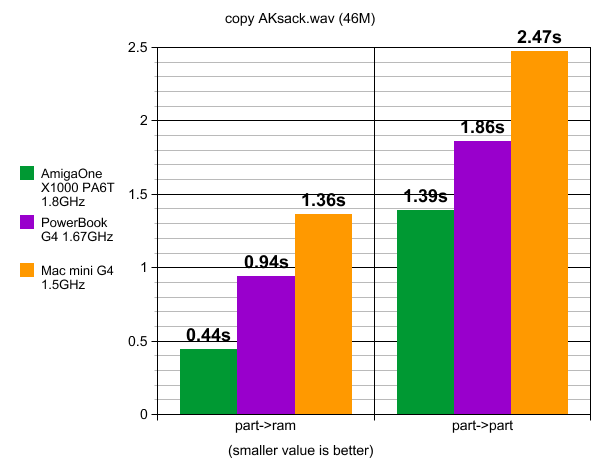

X1000 is of course still faster (as would likely be Sam 440/460 as well).

It should be noted that many things can affect such benchmark, such as the filesystem being used (copy may return immediately if delayed writing is applied by the filesystem). Another significant factor is the physical location of the partitions, are they located on the same or different HDDs? And finally, rotating HDDs are clearly slower than SSD.

Notes: The PowerBook has a newer Western Digital Scorpio Blue WD2500BEVE 250GB 5400 RPM 8MB Cache 2.5" HDD, while the Mac mini has the original Apple branded Seagate Momentus 5400.2 ST9808211A 80GB HDD).


I dont know wy this values are so slow.I test with i5 760 with winuae and disable JIT.so sysspeed show 84 Mips and readfastl and writefastl both transfer 296.44 megabytes.

so my system get really slow then.

But the copy test need 0.5 sec on my solid State disk OCZ Vertex 2 120 gb (i boot windows so nothing in cache )  

I do the test on a slow 2.5 drive with 5400 rpm WDC3200.here it need 0.6 sec.(after reboot windows too)

When i do a second copy, then time go less 0.3 sec.

when i enable the JIT i get 1184 mips and readfastl writefastl 1092 -1300 megabytes.i use min and max values i get.with jit the tests run so fast, that timer accuracy have some influence.

How do you measure the time ?
maybe the time is not exact measure.I think every system is fast enough to copy files at same speed.

The X1000 mem benchmark show for 2. level cache near same values as for mem transfer.
i think this is problem the testcode fit in the 2 megabyte 2. Level Cache of pa6.TO get real values, there need a test that copy 20 megabyte or more mem

 

Offline unusedunused

  • Sr. Member
  • ****
  • Join Date: Nov 2005
  • Posts: 479
    • Show all replies
Re: X1000 benchmarks
« Reply #1 on: February 06, 2012, 01:29:09 PM »
Quote from: Piru;679020
I've always found those old results weird. I don't know what is wrong with the said system (maybe highly fragmented SFS partition?), but these are the results I get:


X1000 is of course still faster (as would likely be Sam 440/460 as well).

It should be noted that many things can affect such benchmark, such as the filesystem being used (copy may return immediately if delayed writing is applied by the filesystem). Another significant factor is the physical location of the partitions, are they located on the same or different HDDs? And finally, rotating HDDs are clearly slower than SSD.

Notes: The PowerBook has a newer Western Digital Scorpio Blue WD2500BEVE 250GB 5400 RPM 8MB Cache 2.5" HDD, while the Mac mini has the original Apple branded Seagate Momentus 5400.2 ST9808211A 80GB HDD).

I dont know wy this values are so slow.I test with i5 760 with winuae and disable JIT.so sysspeed show 84 Mips and readfastl and writefastl both transfer 296.44 megabytes.

so my system get really slow then.

But the copy test (part to part) need 0.6 sec on my solid State disk OCZ Vertex 2 120 gb (i boot windows so nothing in cache )  

I do the test on a slow 2.5 drive with 5400 rpm WDC3200.here it need 0.9 sec.(after reboot windows too)

When i do a second copy, then time go less 0.2 sec. on all systems

when i enable the JIT i get 1184 mips and readfastl writefastl 1092 -1300 megabytes.i use min and max values i get.with jit the sysspeed tests run so fast, that timer accuracy have some influence.

I think every system is fast enough to copy files at same speed.if not, its problem of harddrive, or file system handle read or write cache diffrent.enable the JIT do not speedup anything only second copy in windows cache is then faster.

The X1000 mem benchmark show for 2. level cache near same values as for mem transfer.
i think this is problem the testcode fit in the 2 megabyte 2. Level Cache of pa6.TO get real values, there need a test that copy 20 megabyte or more mem
« Last Edit: February 06, 2012, 01:38:55 PM by bernd_afa »