Welcome, Guest. Please login or register.

Author Topic: Formatting CF (CompactFlash) with WinUAE- Dramas  (Read 6650 times)

Description:

0 Members and 1 Guest are viewing this topic.

Offline Xamiche

Re: Formatting CF (CompactFlash) with WinUAE- Dramas
« on: April 29, 2008, 11:58:56 AM »
To change the HD safety option you need to change the Target information in the WinUAE short cut to;

"C:\Program Files\WinUAE\winuae.exe" -disableharddrivesafetycheck


Or whatever your path to WinUAE is.

Edit:

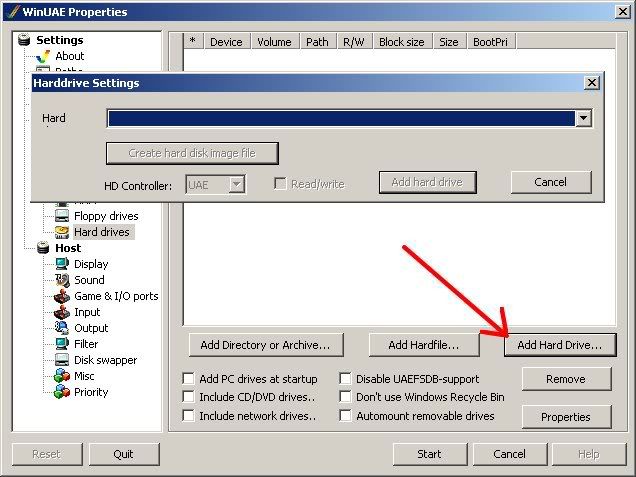
I did the same thing your attempting, not too long ago. I had trouble getting Workbench in WinUAE to see the hard disk. Make sure the CF Card doesn't already have a windows type partition. If it does, WinUAE seems to not wont to recognise it. After I added the 'disableharddrivesafetycheck' in the WinUAE shortcut, I got a KillDisk programme and nuked the partition on my CF Microdrive, then opened WinUAE and clicked the "Add Hard Drive" button", and found my CF Card in the drop down menu.

A500, A600, A1200, A2000, A4000D, A4000T, CD32
 

Offline Xamiche

Re: Formatting CF (CompactFlash) with WinUAE- Dramas
« Reply #1 on: April 29, 2008, 12:08:33 PM »
Are you finding the drive in the Add Hard Drive drop down menu?
A500, A600, A1200, A2000, A4000D, A4000T, CD32
 

Offline Xamiche

Re: Formatting CF (CompactFlash) with WinUAE- Dramas
« Reply #2 on: April 29, 2008, 12:12:12 PM »
Oh, you have the CF card connected via the PCMCIA slot? Well that's different. I did mine with a CF -> IDE adaptor connected to the IDE interface in the Amiga. I'm not sure how it would work with a PCMCIA CF adaptor.
A500, A600, A1200, A2000, A4000D, A4000T, CD32
 

Offline Xamiche

Re: Formatting CF (CompactFlash) with WinUAE- Dramas
« Reply #3 on: April 29, 2008, 01:09:59 PM »
Just an FYI on changing the HDTools device. It's 'uaehf.device' not 'uaehd.device'. The 'hf' part isn't a typo.
A500, A600, A1200, A2000, A4000D, A4000T, CD32